
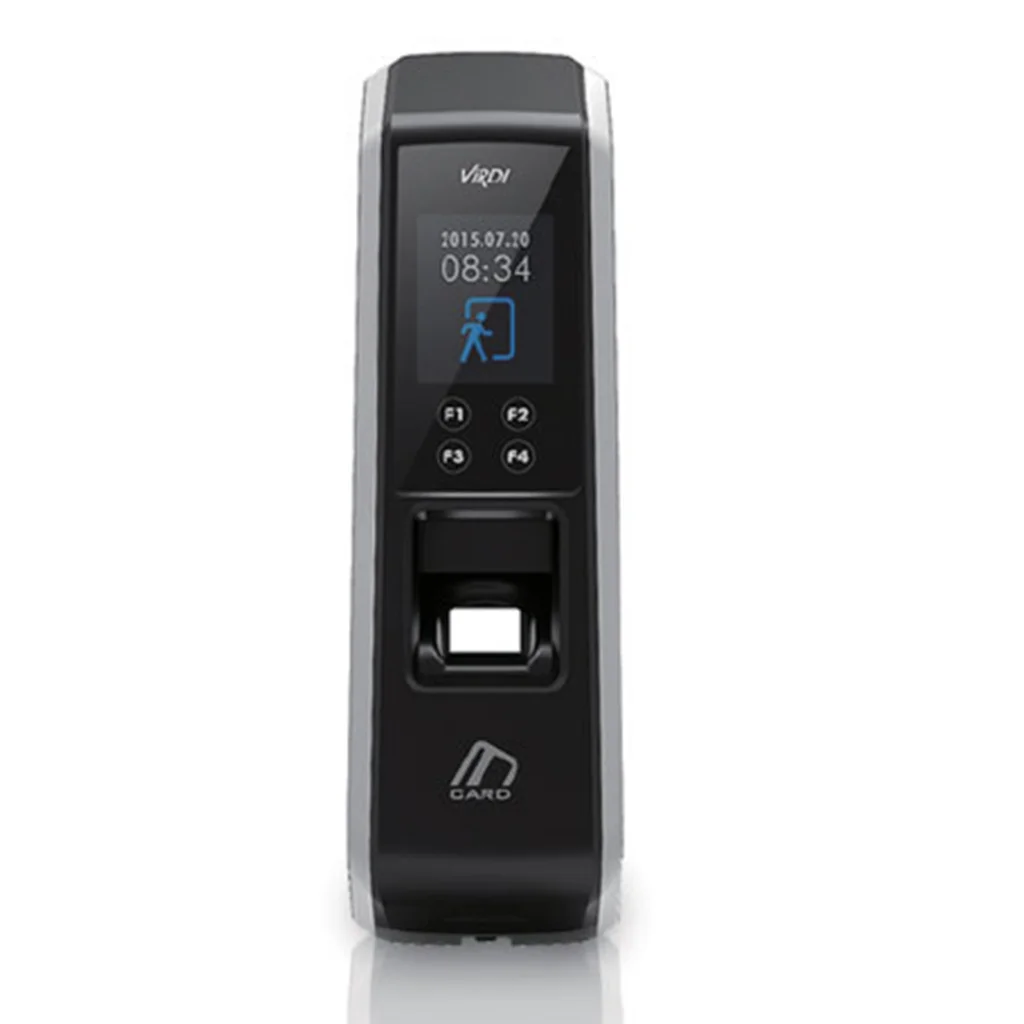
AC-2100 Plus
Special Features:
- Use card or fingerprint or both of them
- Korean fingerprint sensor
- Recognize fake fingerprint
- Auto sense fingerprint
- Enable to define 10 fingerprint for each person
- Access Control with digital camera 640*480 pixel
- USB, Wiegand, RS485, LAN connection port
- Anti-dust and water IP65 protocol
- Biometric Access Control with contactless reader 125 KHz or 13.56 MHz
- Using external reader by Wiegand port
- Recognize fingerprint standalone and via Ethernet
- Setting device with keyboard and software
- Access Control with In-put, out-put relay for control gates
- Get transaction data by LAN connection
- Work as an Access Control
- UPS with Li-ion polymer battery 3.7 volt 2500 mAh (optional)
- Get online transaction
- Easy update by software
Advantages of Virdi AC-2100 Plus
- Live Finger Detection
- Fast Authentication Speed
- Water-Resistant
- Intelligent Capture
- Auto-sensing
- Multiple Application
- Easy and accurate operation with convenient graphic LCD
- Improved security.
- Faster access.
- Higher accuracy.
- Greater convenience.
- Helpful for calculating overtime
- Calculate lateness
Consider before buying Virdi AC-2100 Plus Outdoor Fingerprint Time Attendance Terminal
Before buying the Virdi AC-2100 Plus Fingerprint Time Attendance Terminal, you need to consider some queries. These are: How many employees do you have? What type of basic timesheet or detailed data do you prefer? How much spending capacity do you have, if any at all? Do you want online or on-site support for your attendance data if multiple sites are in use? In addition, You have to consider:
- Accuracy - To avoid any mistakes or discrepancies, it's important to have a time clock that is as accurate as possible. The device should be able to punch in and out at the correct times. This is one of the most important reasons why you are buying this machine!
- Integration - Your time attendance device should work with other software from different vendors and integrate seamlessly for maximum efficiency. The universality of your machine can make it last longer too!
FAQ on the Biometrics attendance system.
1. Which is the recommended finger to be used for a fingerprint scanner?
You can use any of the ten fingers for verification. The index and thumb are much easier for the scanner to capture rather than other fingers.
2. Does this fingerprint device secure?
It is highly secure for you, and it enhances your privacy by providing encryption and biometrics functionality. In this technology, fingerprints cannot be duplicated, lent, or stolen.
3. Can fingerprint images be duplicated?
No. The fingerprint image is not stored; it uses the algorithm concept before the mathematical data is stored as uniquely yours. The fingerprint obtained from other sources will not be recognized as a life finger is needed for verification.
| Authentication Method | Biometric |
| Dust/ Water Resistance | IP65 |
| MEMORY | |
| Max Users | 10,000 |
| Fingerprints(Templates) | 20,000 (1:1) |
| 3,000 (1:N) | |
| Logs | 100,000 |
| Images | X |
| COMMUNICATION | |
| With Server | TCP/IP |
| Other | USB |
| Wireless LAN(Wi-Fi) | OX |
| Wiegand OUT | 0 |
| RS232 | X |
| RS485 | OSDP |
| Wiegand IN | 0 |
| DISPLAY | |
| LCD | 1.77″Color LCD |
| Backlight | 0 |
| Embedded Camera | X |
| CARD | |
| 125khz-EM | 0 |
| HID Prox | X |
| HID iclass | X |
| 13.56MHz Smart Card | 0 |
| Keypad | X |
| Function keys | 4 |
| Door Phone | X |
| FP SENSOR | |
| Platen Area | 14.8 X 17.9 mm |
| Resolution | 500 dpi |
| DIMENSION | |
| (W) X (H) X (D) mm | 58 X 187.9 X 51.6 mm |
| FRR /FAR | 0.1% / 0.0001% |
| Operating Temperature | -20 ~ 60℃ |